Every US state keeps its own compliance calendar. Some want an annual report every year and others every two; some set the date by formation, others by fiscal year end. A nonprofit’s deadline is often not the one a for-profit corporation in the same state follows, and a statutory trust can owe a report that nobody thought to diarise. Tracking all of that by hand, across dozens of entities and jurisdictions, is where deadlines slip.
MinuteBox 2026.28, released October 22, brings Automated Compliance to every US state and territory. For Canadian entities and registrations, it also lets you check an Ontario filing against the registry before you submit it and order an Ontario profile report as of a past date.
Watch what’s new in MinuteBox 2026.28.
Automated Compliance in every US state and territory
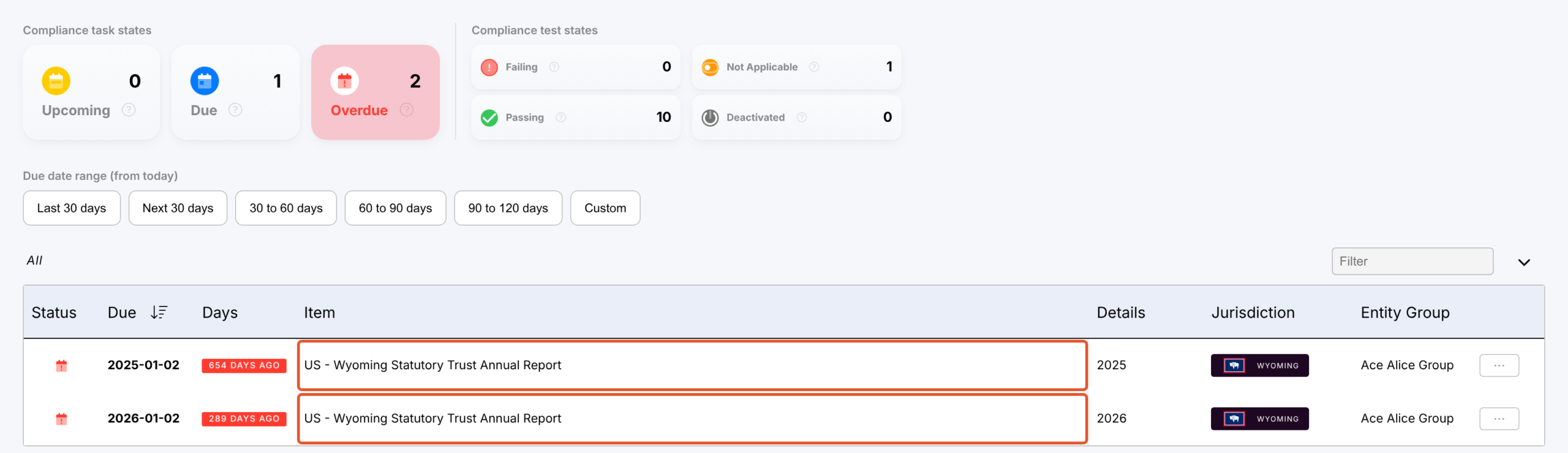
A Wyoming statutory trust's annual reports, listed as compliance tasks in its "Compliance" panel.
Automated Compliance now covers corporations and LLCs in all 50 states, the District of Columbia and the five inhabited US territories. For the first time, it also covers trusts, nonprofit corporations, partnerships (general, LP, LLP and LLLP), professional corporations, PLLCs and cooperatives, wherever their jurisdiction sets a rule.
There’s no calendar to build. MinuteBox works out each entity’s deadlines from its formation or incorporation date, its fiscal year end and its jurisdiction. Your existing entities are checked again automatically. New items appear in Compliance and Global Tasks. Some may already show as Overdue, which is exactly what you want to know now rather than later.
The filing itself stays with you and can be completed using MinuteBox’s integrated Registry Services module. Automated Compliance tells you what is due and when; you decide what to file.
For law firms: see your clients’ US annual reports and checks in one task list, across states and entity types.
For in-house teams: bring the trusts, partnerships and nonprofits in your group into the same compliance view as your corporations and LLCs.
Compare an Ontario filing with the registry before you submit
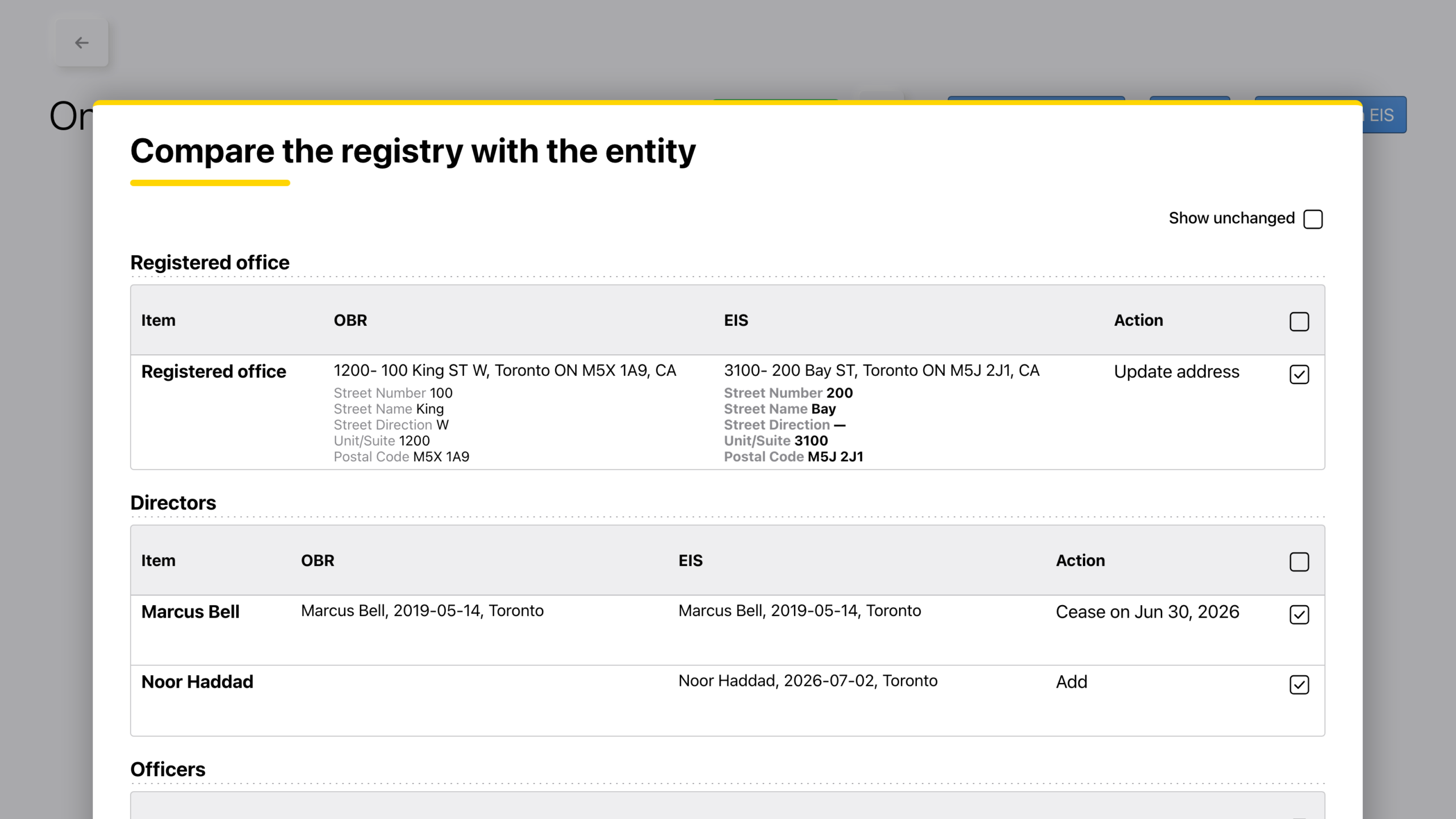
"Compare the registry with the entity" shows the Registered Office, directors and officers the registry holds, beside your own records.
An Ontario Annual Return or Notice of Change starts from what the Ontario Business Registry has on file, not from your minute book. On an Ontario Annual Return or Notice of Change in MinuteBox, Validate now opens Compare the registry with the entity. It shows the Registered Office, directors and officers the registry holds, beside your own records.
Each row says what it would do (Add, Cease on, Edit, Update address). Tick the ones you want and they go into the filing. Rows with no change are tucked away and formatting differences such as postal code spacing don’t count as changes. You can reopen it any time with Update from EIS.
For law firms: catch the director who resigned in the minute book but is still on the registry before you file a client’s Annual Return.
For in-house teams: keep subsidiary filings in line with your own entity records, one ticked row at a time.
Order an Ontario profile report as of a past date
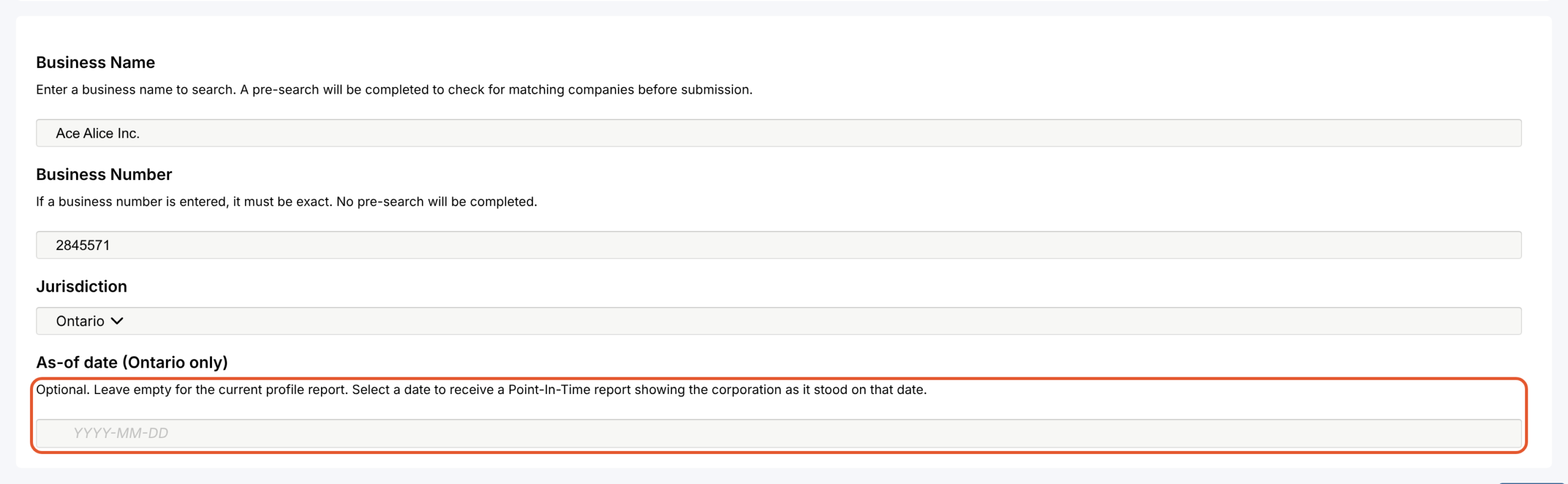
The Ontario Corporate Profile Report form with its new optional "As-of date" field.
Due diligence often asks what a corporation looked like on a particular day, not today. The Ontario Corporate Profile Report in MinuteBox now has an optional As-of date field. Pick a past date for a Point-In-Time report showing the corporation as it stood that day or leave it empty for the current report.
For law firms: confirm a corporation’s directors as of a past closing date without leaving MinuteBox.
For in-house teams: answer an auditor’s “who was on the board then?” with the registry’s own record.
Why this matters
Compliance work fails quietly. It could be a deadline nobody diarised, a director the registry still lists or a question about last year that takes a day to answer. This release closes those gaps. Automated Compliance now keeps the US calendar for you from the records you already keep, Ontario filings are checked against the registry before they go in and the registry’s history is a date field away. Reports can also name each entity’s current responsible lawyer and clerk, so you can see at a glance who looks after what.
There’s much more packed in this release and MinuteBox customers can read the full release notes in the Learning Hub.